


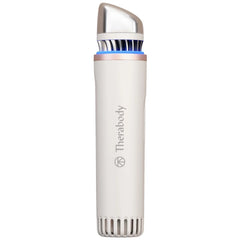


Therabody TheraFace Depuffing Wand- White
Peace out, puffiness. Say hello to your new skincare hero, the firstofitskind TheraFace Depuffing Wand that features cold...
- $51.00
$169.99- $51.00
- Unit price
- per
Hurry up! Only 1000 left
Limited-Time Offers, End in:
151D
8H
23M
0S
Subtotal:
$51.00
10 customers are viewing this product
Couldn't load pickup availability
Free Shipping
Free standard shipping on orders
Free Returns
Learn More.
Peace out, puffiness. Say hello to your new skincare hero, the firstofitskind TheraFace Depuffing Wand that features cold and heat facial treatments in one portable device for use at home and onthego. Clinical studies showed decreased puffiness and dark circles under the eyes, and enhanced radiance. It delivers sciencebacked temperatures that are safe for delicate skin, ensuring consistent and reliable results across your entire face. Choose from 3 preset temperature levels suitable for all skin types. The wand reaches every corner and crevice of your face with its contoured applicator tip, giving you allover, feelgood results you can see in just minutes.
ScienceBacked Benefits:
- Decrease Puffiness
- Enhance Radiance
- Reduce Dark Circles
Product Features:
- Refreshing cold treatment: Cools in seconds to help decrease puffy eyes, revitalize tiredlooking eyes and minimize the appearance of pores.
- Rejuvenating heat treatment: Boosts circulation, helps improve skincare product absorption and enhances overall radiance.
- Revitalizing contrast therapy: Start with the heat treatment to boost circulation, then switch to the cooling treatment to soothe and reduce puffiness to improve skin elasticity and firmness.
- Contoured, easyglide applicator tip: The curved shape is designed to reach all areas of the face, even small, hard to reach spots like under the eyes and nasal folds.
- Ultraportable, lightweight design: Use the wand inflight or after a long drive to reduce puffiness, minimize the effects of jet lag and improve glow. Simple, two button control to power on/off, switch between hot/cold treatments, and to change temperature settings
- Your wellness, our science: Therabody is led by science. We scientifically validate each product from concept to completion so customers can trust Therabody products to deliver the results they need and
- deserve.
- FDA registered medical device
What's Included:
- TheraFace Depuffing Wand device
- Travel cap
- USBC charging cable
Using the TheraFace Depuffing Wand
1. Prepare for treatment. Cleanse and completely dry your face before using the TheraFace Depuffing Wand. Avoid the use of oils, lotions, and all other serums when using the device to prevent damage to the device.
2. Remove the device cap. Gently pull off the device cap to remove it from the device. Do not use the device while the cap is attached to either end.
3.Turn on the device. Press and hold either the cold or heat button to turn on the device and begin the cold or heat treatment. The blue LED light will turn on during the cold treatment, and the orange LED light will turn on during the heat treatment.
4. Select your desired temperature setting. Press the cold or heat button (depending on your selected treatment) to toggle through the three temperature options: cold, colder, and coldest; warm, warmer, and warmest. The LED light will get brighter as the temperature intensity increases. The device will flash once at the lowest intensity, twice at the second intensity, and three times at the third intensity setting. The total treatment time is six minutes. The six-minute timer will reset if you change from cold to hot or hot to cold during treatment. The timer will not reset when the temperature intensity is changed within a treatment.
a. Cold settings: There are three cold temperature options: 14°C (57°F) (default), 12°C (54°F), 10°C (50°F).
b. Heat settings: There are three heat temperature options: 35°C (95°F) (default), 38°C (100°F), 42°C (108°F).
5. Use the TheraFace Depuffing Wand on one side of your face. Avoid covering the air vents of the device throughout your treatment to achieve target temperatures. Place the device on one side of your face, gently moving underneath your eyes and throughout your face.
6. Use the TheraFace Depuffing Wand on the other side of your face. After three minutes, the device's light will flash to signal you to switch to treating the other side of your face.
7. Turn off the device. The TheraFace Depuffing Wand will automatically shut off after the treatment is completed (6 minutes). Press and hold the cold or heat button at any point during the treatment to turn off the device. The LED light will turn off when the device is off.
8. Lock the device. When not in use or during transport, lock the device to prevent battery drainage or turning it on accidentally. Quickly press either the cold or heat button three times to initiate the lock function. The LED light will turn purple when successfully locked. Quickly press three times again to unlock. The LED light will turn green when successfully unlocked. If you try to turn the device on while locked, the LED light will turn purple

Related Products
Example product title
- $51.00
$169.99- $51.00
- Unit price
- per
Example product title
- $51.00
$169.99- $51.00
- Unit price
- per
Example product title
- $51.00
$169.99- $51.00
- Unit price
- per
Example product title
- $51.00
$169.99- $51.00
- Unit price
- per
Example product title
- $51.00
$169.99- $51.00
- Unit price
- per
Example product title
- $51.00
$169.99- $51.00
- Unit price
- per
Example product title
- $51.00
$169.99- $51.00
- Unit price
- per
Example product title
- $51.00
$169.99- $51.00
- Unit price
- per
Example product title
- $51.00
$169.99- $51.00
- Unit price
- per
Example product title
- $51.00
$169.99- $51.00
- Unit price
- per
Recently Viewed Products
Example product title
- $51.00
$169.99- $51.00
- Unit price
- per
Example product title
- $51.00
$169.99- $51.00
- Unit price
- per
Example product title
- $51.00
$169.99- $51.00
- Unit price
- per
Example product title
- $51.00
$169.99- $51.00
- Unit price
- per
Example product title
- $51.00
$169.99- $51.00
- Unit price
- per
Example product title
- $51.00
$169.99- $51.00
- Unit price
- per
Example product title
- $51.00
$169.99- $51.00
- Unit price
- per
Example product title
- $51.00
$169.99- $51.00
- Unit price
- per
Example product title
- $51.00
$169.99- $51.00
- Unit price
- per
Example product title
- $51.00
$169.99- $51.00
- Unit price
- per
- Choosing a selection results in a full page refresh.


